
 Crawvix Editorial Team
· Published October 28, 2026 · Last updated October 28, 2026 · 7 min read
Crawvix Editorial Team
· Published October 28, 2026 · Last updated October 28, 2026 · 7 min read
MTA-STS (SMTP MTA Strict Transport Security) lets a domain tell sending mail servers to deliver its mail only over an encrypted connection to the mail servers it names, and to refuse delivery otherwise. TLS-RPT (SMTP TLS Reporting) asks those senders to report encryption failures to you. Both protect mail sent to your domain. They do not affect mail you send, and they are separate from SPF, DKIM and DMARC. Support is up to each sending server, so they reduce risk rather than remove it.
Before you begin
You need three things. First, mail servers that support encrypted connections (STARTTLS) with certificates that are valid for the server names in your MX records. If you use a large hosted mail provider, the provider normally manages this, but you still need its exact MX host names. Second, a website host name, mta-sts.yourdomain, served over HTTPS with a certificate from a publicly trusted authority, where you can publish a file at a fixed path. Third, access to your DNS and a mailbox for reports. Some basic shared hosting plans cannot serve a separate host name with its own certificate; check yours before you start. MTA-STS is optional and is not among the SPF, DKIM and DMARC requirements that Google and Yahoo set for bulk senders.
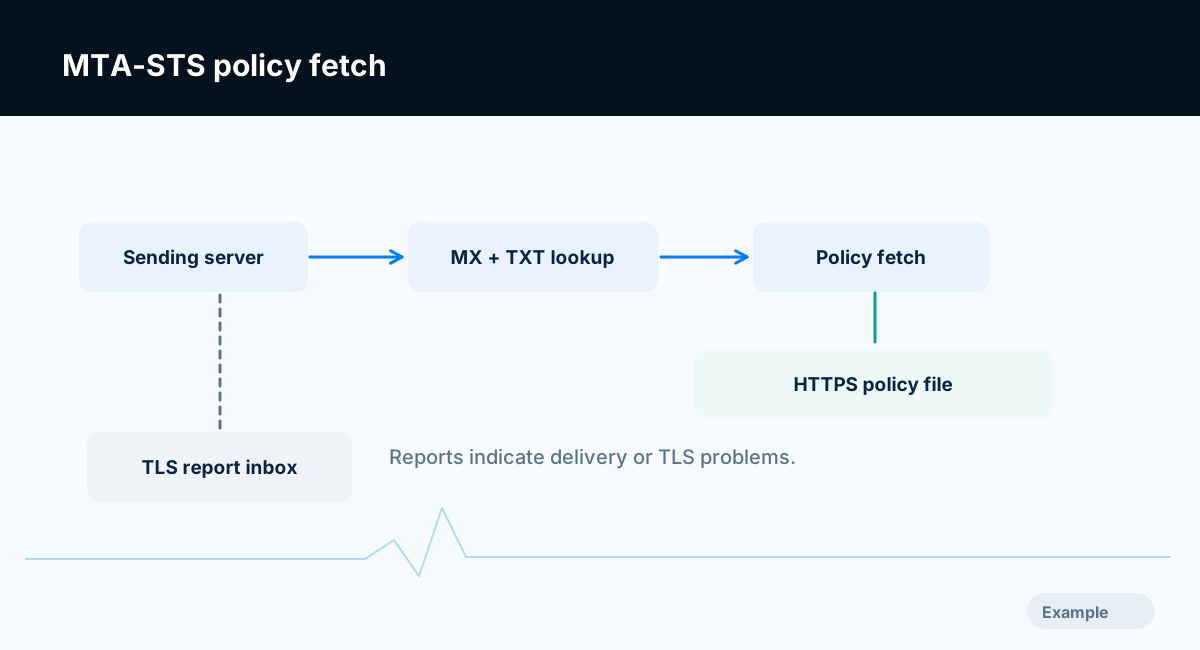
Example diagram, not a result from any real site.
Step-by-step instructions
Step 1: Confirm your MX hosts and their certificates
Look up your MX records and write down every host name. Confirm with your mail provider that each of those servers offers STARTTLS with a valid certificate for that name. In an enforcing policy, a sender that cannot get a valid encrypted connection to one of these hosts will not deliver the message.
What success looks like: You have the list of MX host names and know their certificates are valid.
Step 2: Serve the policy file over HTTPS
Create the host name mta-sts.yourdomain in DNS and serve this file at https://mta-sts.yourdomain/.well-known/mta-sts.txt:
version: STSv1
mode: testing
mx: mail.example.com
mx: *.mail.example.com
max_age: 604800
The values above are examples. version must be STSv1. mode is testing, enforce or none. Each mx line names a mail host from step 1; a wildcard such as *.mail.example.com matches exactly one extra label. max_age is how many seconds senders may cache the policy; the standard expects values in the range of weeks or more once you are confident, with a maximum of 31557600. The file must be served directly with a 200 status and the text/plain content type. Senders do not follow redirects when fetching it, so do not redirect this URL.
What success looks like: Opening the URL in a browser shows the plain text policy with no redirect and no certificate warning.
Step 3: Publish the DNS record
Add a TXT record at _mta-sts.yourdomain with a value such as:
v=STSv1; id=20261028
The id is any string of 1 to 32 letters and digits. Change it every time you change the policy file, so senders know to fetch the new one. A date or a counter works. Keep exactly one such record.
What success looks like: A DNS lookup for _mta-sts.yourdomain returns one record starting v=STSv1.
Step 4: Add TLS-RPT before you enforce
Add a TXT record at _smtp._tls.yourdomain:
v=TLSRPTv1; rua=mailto:tls-reports@example.com
The rua value can be a mailto: address or an https:// endpoint. Reports are machine-readable JSON, usually sent about once a day and often compressed, by senders that support TLS-RPT. Not every sender does. Use an address you control and a tool or script that can read the reports. Crawvix treats TLS-RPT as advisory: it is useful but not required.
What success looks like: A DNS lookup for _smtp._tls.yourdomain returns one record starting v=TLSRPTv1 with a valid rua.
Step 5: Run in testing mode and read the reports
In testing mode, senders that support MTA-STS still deliver mail when a secure connection fails, and report the problem through TLS-RPT. Leave it long enough to see typical traffic, which depends on how much mail you receive. Look for certificate name mismatches, expired certificates and MX hosts missing from the policy.
What success looks like: The reports show no unexpected secure delivery failures.
Step 6: Move to enforce
Change mode: testing to mode: enforce, publish the file, and change the id in the DNS record. A sender that has cached the earlier policy keeps using it until it expires or it sees the new id. Do not use mode: none as a permanent state; it switches MTA-STS off, and the Crawvix check reports it as Failing.
What success looks like: The policy says enforce, the id has changed, and test mail from a supporting provider still arrives.
Step 7: Maintain it
Update the policy file and the id whenever your MX hosts change, and before you move to a new mail provider, otherwise enforcing senders may refuse to deliver. Renew the web certificate for mta-sts.yourdomain; an expired certificate there breaks policy fetching.
What success looks like: Changes to mail hosting include the MTA-STS file and id.
Final verification checklist
Every MX host supports encrypted connections with a valid certificate.
https://mta-sts.yourdomain/.well-known/mta-sts.txtreturns 200,text/plain, with no redirect.The policy has
version: STSv1, a validmode, onemxline for each real mail host, and amax_age.One TXT record exists at
_mta-sts.yourdomainwith anidthat changes with each policy edit.One TXT record exists at
_smtp._tls.yourdomainwith a workingrua.You ran testing mode and reviewed reports before switching to
enforce.
Common mistakes to avoid
Going straight to
enforcewithout testing mode and reports.Leaving a real mail host out of the
mxlines.Serving the policy through a redirect or as
text/htmlfrom a CMS.Changing the policy without changing the
id.Letting the certificate on
mta-sts.yourdomainexpire.Expecting MTA-STS to protect mail you send.
Troubleshooting
The policy URL returns 404
The host name may not exist in DNS, may point to a site that does not serve .well-known files, or the file may be in the wrong folder. Request the exact URL from a browser to see what is returned.
The certificate warning appears on the policy URL
The certificate must be valid for mta-sts.yourdomain itself. A certificate for only the main site name does not cover it.
The policy is served as HTML or downloads as a file
Your server or CMS is setting the wrong content type. The standard requires text/plain.
The Crawvix check says the mx lines do not cover a host
Compare the policy with the MX records. Add the missing host name, publish the file and change the id. Wildcards match one label only.
Reports show failures from one sender
Check the failure type in the report. Certificate mismatch, an expired certificate and no STARTTLS support are common causes. Fix the mail server or contact the provider.
Mail from some senders stopped after enforcing
Return to testing, change the id, and review reports. Enforcement can only block senders that honor MTA-STS.
Frequently asked questions
Is MTA-STS required?
No. It is optional hardening for inbound mail. Required items for many senders are SPF, DKIM and DMARC.
What about DANE?
DANE is a different way to secure mail delivery. It relies on DNSSEC and is supported by a different set of senders. MTA-STS does not need DNSSEC.
Does TLS-RPT work without MTA-STS?
Yes. TLS-RPT reports on secure delivery problems whether or not you publish an MTA-STS policy, for senders that support it.
How long should max_age be?
Short values reduce protection and long ones make mistakes last longer. The standard expects weeks or more in normal use. The Crawvix check warns when the value is under one day.
Related guides
Official references
Provider screens and sender support change, so a human should check these sources for the current wording before this guide is published.
Next step: See how Crawvix checks a website and capture a baseline once scanning opens. This guide provides technical information, not a guarantee of inbox delivery, rankings or index inclusion.