
 Crawvix Editorial Team
· Published October 28, 2026 · Last updated October 28, 2026 · 7 min read
Crawvix Editorial Team
· Published October 28, 2026 · Last updated October 28, 2026 · 7 min read
SPF (Sender Policy Framework) is a DNS record that lists which servers may send email for your domain. Receiving servers check it, together with DKIM and DMARC, when they decide what to do with a message. A correct SPF record helps receivers trust your mail, but it does not guarantee inbox delivery.
Before you begin
Make a list of every service that sends email as your domain: your mailbox provider, the website contact form, a newsletter tool, an invoicing or helpdesk tool. You also need access to wherever the domain's DNS is managed. Copy the current record somewhere safe before you edit it, because a mistake can send genuine mail to spam. DNS changes can take time to reach every resolver, depending on the record's TTL.
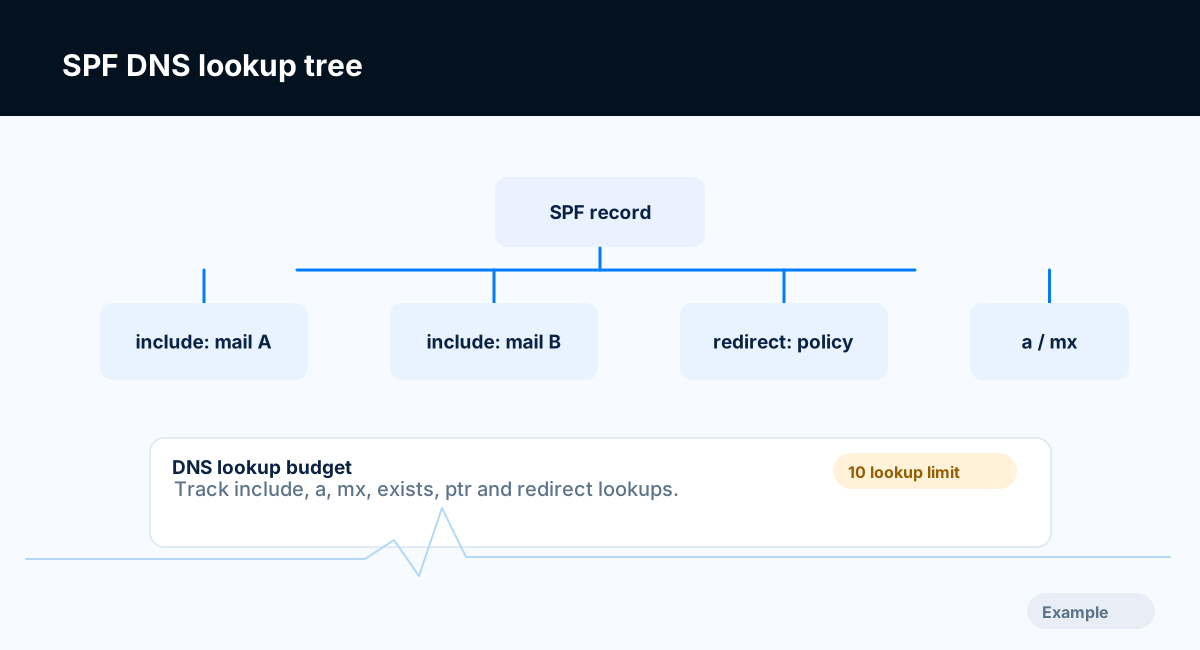
Example diagram, not a result from any real site.
Step-by-step instructions
Step 1: See what is published now
Look up the TXT records at your domain with a DNS lookup tool, for example nslookup -type=TXT example.com or dig +short TXT example.com. An SPF record is a TXT record whose value starts with v=spf1.
What success looks like: You know whether there are zero, one or several SPF records.
Step 2: Keep exactly one SPF record
A domain must have one SPF record. When a receiver finds more than one, the standard (RFC 7208) says the result is a permanent error, so SPF is effectively ignored. If you have two, merge them into a single v=spf1 value and delete the extra record. Services that send for you usually give an include: value to add; they should not ask you to create a second record.
v=spf1 include:spf.mailprovider.example include:spf.newsletter.example ip4:203.0.113.25 ~all
The example above is illustrative and uses reserved example names and a documentation IP address. Take the exact include: value for each service from that service's current documentation.
What success looks like: One TXT record starting v=spf1 covers every legitimate sender.
Step 3: Stay within 10 DNS lookups
SPF allows at most 10 mechanisms and modifiers that cause DNS lookups while a record is evaluated. include, a, mx, ptr, exists and the redirect modifier each count, and lookups inside an included record count too. ip4, ip6 and all do not count. A record that needs more than 10 returns a permanent error. The standard also recommends stopping at two lookups that return nothing (void lookups), and some receivers enforce this.
Because the count includes nested records, you cannot see it by reading your own record alone. The Crawvix SPF check follows the includes and redirects and reports how many of the 10 lookups are used. It counts the worst case, every term before the final all, even though a real message might match an earlier term and stop sooner. To reduce the count:
Remove
include:entries for services you no longer use.Send different kinds of mail from different subdomains, each with its own SPF record and its own limit.
Replace an
include:withip4:addresses only when the provider publishes stable addresses and you will keep them up to date. Copying a provider's addresses into your record (often called flattening) goes stale when the provider changes them.Avoid
ptr. The standard discourages it.
What success looks like: The record needs 10 lookups or fewer.
Step 4: End the record on purpose
The last term says what to do with senders you did not list. -all (fail) and ~all (soft fail) are both accepted by the Crawvix check, except that a domain which sends no email is expected to use -all. ~all is often used while you are still discovering senders, and -all once the list is complete. Never use +all, which authorizes every sender on the internet. ?all (neutral) says nothing about unlisted senders and is flagged. A domain that sends no email at all should publish exactly v=spf1 -all.
What success looks like: The record ends with ~all or -all, or with a redirect= to a record that does.
Step 5: Publish it as a TXT record
Add or edit the TXT record at the domain itself (some DNS panels call this host @). Use the TXT record type, not the obsolete SPF record type. Many panels add the surrounding quotes for you, so check how yours displays the result. A single DNS string holds up to 255 characters; longer values are split into several strings, which most DNS hosts handle for you. Keep the record short.
What success looks like: A fresh DNS lookup shows exactly the record you intended.
Step 6: Test with a real message
Send a message from each system that sends as your domain to a mailbox you control. In Gmail, open it, choose Show original, and look for SPF: PASS. SPF checks the envelope sender (the Return-Path domain), not the From address people see. When a third-party service sends with its own bounce domain, SPF can pass for the service's domain while DMARC still needs DKIM to line up with yours. Then run the SPF checks in Crawvix again.
What success looks like: Test messages from every sender show SPF pass, and the Crawvix SPF checks pass.
Final verification checklist
A DNS lookup shows exactly one record starting
v=spf1.Every service that sends email as your domain is covered.
The record needs 10 DNS lookups or fewer.
The record does not contain
+alland ends with~allor-all.A domain that sends no email publishes
v=spf1 -all.A test message from each sender shows SPF pass in the received headers.
Common mistakes to avoid
Adding a second SPF record for a new service instead of editing the existing one.
Using
+all, or?all, in the hope of making mail flow.Adding includes for every tool ever tried and passing 10 lookups without noticing.
Forgetting subdomains or systems, such as the website contact form, that also send mail.
Copying a provider's IP addresses into the record and never updating them.
Troubleshooting
A checker reports a permanent error (permerror)
The usual causes are more than one SPF record, more than 10 lookups, or a syntax error such as a misspelled mechanism. Fix the first problem listed, publish, and test again.
The record looks right but changes do not show
Check that you edited the DNS host that is actually authoritative for the domain. The registrar, a CDN and a separate DNS provider can each show a zone. Then allow time for the TTL of the old record to expire.
SPF passes but mail still goes to spam
SPF is one of several signals. Receivers also look at DKIM, DMARC, sending reputation, complaint rates and message content. See the DKIM and DMARC guides below.
Forwarded mail fails SPF
When a message is forwarded, it arrives from the forwarder's server, which your record does not list, so SPF usually cannot pass. DKIM signatures often survive forwarding, which is one reason to set up both.
The DNS panel rejects the value
Check for stray line breaks or extra quote marks, and whether the panel wants the value with or without surrounding quotes.
Crawvix says it cannot tell yet
The email checks wait until you have said whether the domain sends email, and they report Not checked yet when a DNS lookup does not finish. Answer the email question in the site setup, or run the check again later.
Frequently asked questions
Do I need SPF if I already use DKIM?
Publish both. Google's sender guidelines expect senders to authenticate with SPF or DKIM, and ask bulk senders (about 5,000 or more messages a day to Gmail addresses) to set up SPF, DKIM and DMARC. Thresholds and wording change, so read the current guidelines linked below.
Should I end with ~all or -all?
Both are valid endings. Many owners start with ~all and move to -all once they are sure every sender is listed. Receivers differ in how they treat each, and when DMARC is in place the DMARC policy usually drives the decision.
Does SPF stop people spoofing the From address?
Not on its own. SPF checks the envelope sender, not the visible From address. DMARC is what ties the visible From domain to SPF or DKIM.
Do ip4 and ip6 count toward the 10 lookups?
No. They need no DNS lookup.
Related guides
Official references
Provider screens and sender requirements change, so a human should check these sources for the current wording before this guide is published.
Next step: See how Crawvix checks a website and capture a baseline once scanning opens. This guide provides technical information, not a guarantee of inbox delivery, rankings or index inclusion.